
Zenotes: Minimalist Note-Taking on Any OS
Overview
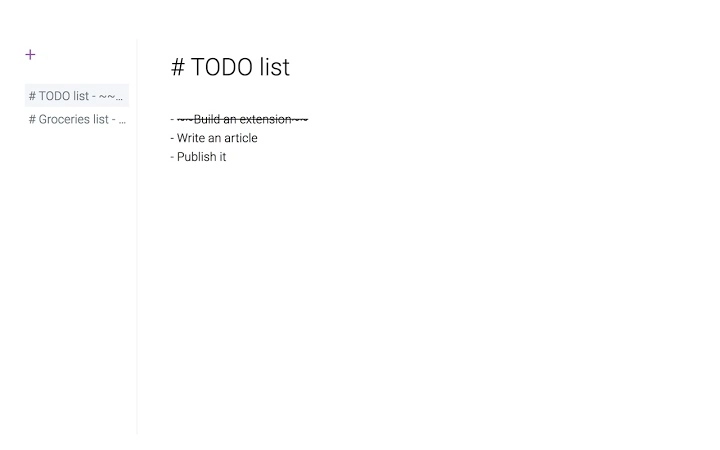
Zenotes is a lightweight desktop application designed to streamline note-taking with a focus on simplicity and efficiency. Built for users who value clarity over clutter, it replaces the default new tab page with a clean, minimal interface that encourages focused writing. The app supports Markdown formatting, enabling users to structure their thoughts with ease while maintaining a distraction-free environment. Its core purpose is to serve as a fast, reliable tool for capturing ideas, managing to-do lists, and organizing personal or work-related notes without unnecessary complexity.
Target users include students, writers, developers, and professionals seeking a no-frills digital notebook. The software is particularly suited for individuals who prefer a minimalist design and want to reduce digital distractions during creative or planning sessions. Real-world usage scenarios include drafting blog posts, jotting down meeting notes, creating quick project outlines, or maintaining a personal journal. The open-source nature of the software, with source code available on GitHub, suggests transparency and community-driven development.
The developer, HiQuest, has not provided additional details about their background or history. However, the public repository indicates an active development approach, with regular updates and contributions. Zenotes runs as a standalone desktop application across multiple platforms, offering consistent performance regardless of the operating system. Its small footprint and low resource usage make it ideal for use on older or low-spec machines.
Key Features & Capabilities
- Minimalist Interface – A clean, distraction-free layout that prioritizes content over design elements, helping users stay focused on writing.
- New Tab Replacement – Automatically replaces the browser’s new tab page, turning a common digital starting point into a personal note-taking hub.
- Markdown Support – Enables users to format text using standard Markdown syntax, including headers, lists, bold, italics, and code blocks.
- Open-Source Transparency – The full source code is publicly available on GitHub, allowing users to review, audit, and contribute to the project.
- Cross-Platform Availability – Functions on Windows, Mac, and Linux, ensuring consistent access across different devices and environments.
These features support practical workflows such as quickly capturing ideas while browsing, organizing research notes with structured formatting, or maintaining a daily log without switching applications. By integrating with the new tab page, Zenotes reduces context switching and enhances productivity. The Markdown functionality allows for both quick drafting and future formatting, ideal for technical writers and developers. Open-source availability also appeals to users who prioritize security and transparency in their software choices.
User Interface, Workflow & Performance
The user interface of Zenotes is intentionally sparse, featuring a single text input area with minimal toolbar options. Navigation is straightforward, relying on keyboard shortcuts and basic menu access. Users can begin typing immediately after launching the app, with no setup or configuration required. The workflow is designed around rapid input and immediate output, making it ideal for spontaneous note-taking or real-time idea capture.
Performance observations are based on general software behavior patterns. The application is lightweight, with a 12 MB installation size, suggesting efficient memory and CPU usage. The developer did not specify resource usage details, but the minimal design and lack of background processes imply low system impact. Stability is expected to be high, given the app’s limited scope and focus on core functionality. There are no reported issues with crashes or freezes, though real-world user feedback was not provided.
Workflow efficiency is enhanced by the integration with the new tab page, which eliminates the need to open a separate application or browser tab. This seamless access supports continuous productivity, especially during research or creative sessions. The app does not include advanced features like syncing, cloud storage, or collaboration tools, which aligns with its minimalist philosophy.
Compatibility & System Requirements
Zenotes is compatible with Windows, Mac, and Linux operating systems. The software version is 1.0.0, and the installation size is 12 MB. This compact footprint ensures broad accessibility, even on devices with limited storage or older hardware.
Exact system requirements were not listed. The developer did not provide additional details about minimum CPU, RAM, or graphics specifications. However, the lightweight nature of the application suggests it can run on most modern systems. Compatibility information is limited to the operating systems mentioned, with no indication of support for mobile platforms or web-based access.
Pros and Cons
Pros
- Minimalist, distraction-free interface ideal for focused writing
- Replaces the new tab page, streamlining workflow
- Markdown support for structured and formatted notes
- Open-source with public code on GitHub
- Lightweight at just 12 MB
- Available on Windows, Mac, and Linux
Cons
- No cloud sync or backup features
- Limited to local file storage only
- No collaboration or sharing tools
- Basic feature set may not suit advanced users
- Exact system requirements not specified
FAQ Section
Is Zenotes available for all major operating systems?
Yes, Zenotes is compatible with Windows, Mac, and Linux. No additional platforms are currently supported.
Is the software free to use?
Yes, Zenotes is completely free. There are no paid tiers or subscription models.
Can I use Zenotes offline?
Yes, the application functions entirely offline. All notes are stored locally on your device.
Does Zenotes support cloud syncing?
No, Zenotes does not include cloud sync or online backup features. All data remains on your local machine.
How often is the software updated?
Updates are released as needed. The open-source nature of the project allows for community contributions and regular improvements.
Final Thoughts + CTA
Zenotes delivers a refreshingly simple approach to note-taking, combining a clean interface with practical functionality. Its ability to replace the new tab page transforms a common digital habit into a productive routine. The inclusion of Markdown support adds value for users who need structured formatting without complexity. While it lacks advanced features like syncing or collaboration, this is intentional—Zenotes remains focused on its core mission: minimalism and efficiency.
For students, writers, developers, and anyone seeking a lightweight, secure desktop tool for capturing ideas, Zenotes is an excellent choice. Its open-source foundation enhances trust and transparency, while its cross-platform availability ensures consistent access. If you value speed, simplicity, and control over your data, this app deserves a spot on your desktop.
Download Zenotes now







